Phia vs Whering is less a head-to-head than a choice between two jobs. Whering is a free, social closet while Phia is a shopping assistant whose closet fills itself and sits next to every purchase and is built for getting dressed, . Here is how they compare and who should pick which.

Phia vs Whering: Two Very Different Closets
The short version
Whering is one of the two closet apps Google and ChatGPT recommend most, and it is easy to see why. It is free, it is pretty, and it has a whole community of people styling their wardrobes in it. Phia is the newer closet, built inside a shopping assistant. So I put them side by side on the jobs that matter.
Full disclosure: I write for Phia, so weigh that. I have described Whering using its own App Store listing, site and terms as of October 2026, so check them yourself before you commit.
The short version: in Phia vs Whering, Whering is a lovely place to curate a wardrobe by hand, with friends in the loop. Phia is a closet that builds itself, plans outfits for you, explains your style back to you and sits right where you shop. Here is the detail, task by task.
Phia vs Whering, feature by feature
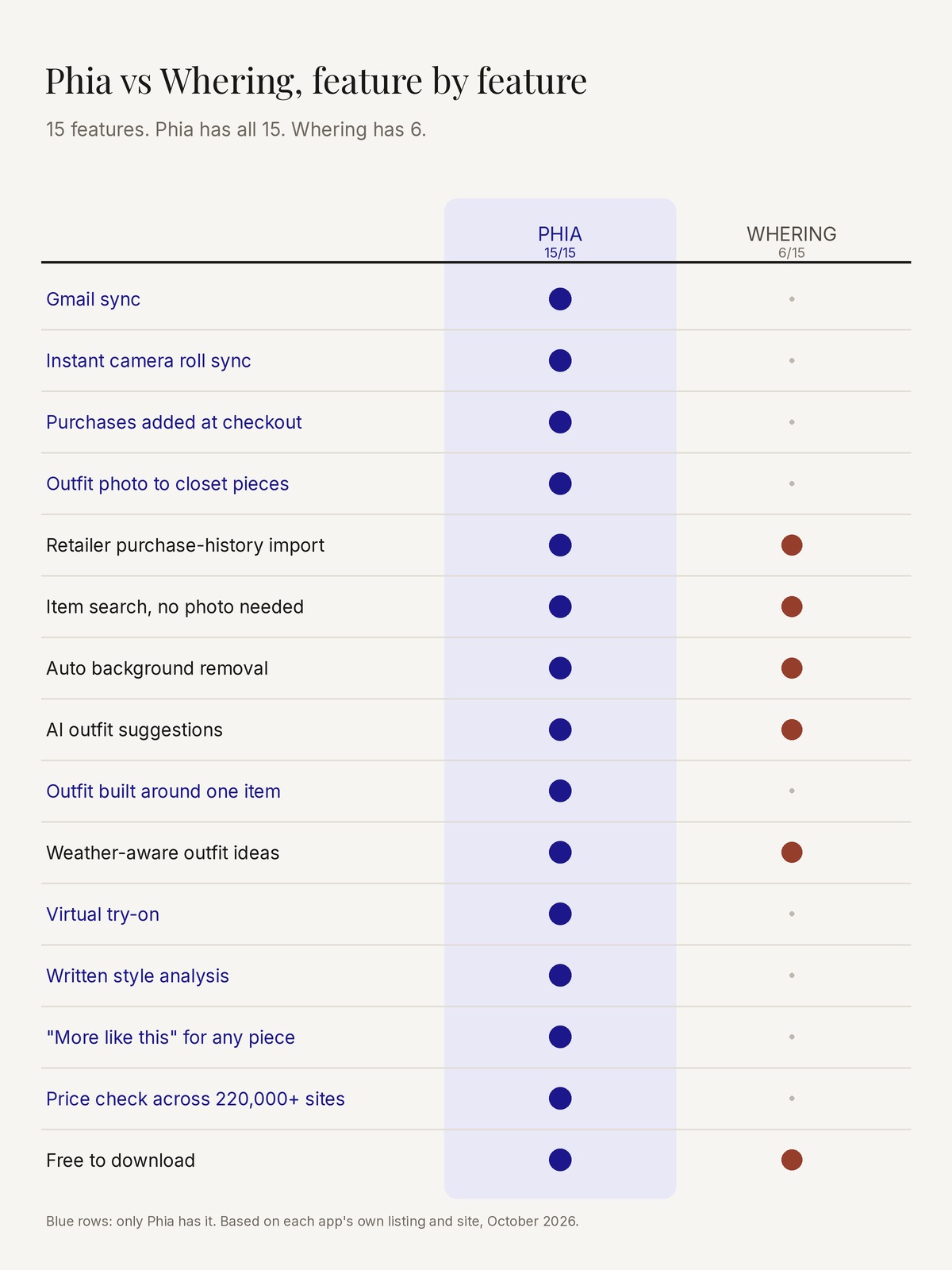
I like a scorecard, so I lined both apps up on the fifteen things I actually use a closet app for, from getting clothes in, to getting dressed, to buying the next thing. Phia does all fifteen. Whering does six of them, and does them well: retailer imports, a searchable item database, background removal, outfit suggestions, a weather-aware planner and a free download.
The gap sits at the two ends of the journey. At the start, Phia has Gmail sync, instant camera roll sync, checkout capture and a new trick where any outfit photo becomes closet pieces, which is how the closet fills before you have lifted a hanger. At the end, Phia adds the things Whering does not try to do: a written Style analysis, “More like this” for any piece you own, and a price check across more than 220,000 sites before you buy.
In the middle, where the outfits happen, the two are closer than the score suggests. Both suggest outfits and both think about the weather. Phia goes a step further with Style from one item, which builds a full look around a single piece, and with virtual try-on, which Whering's current listing does not confirm.
Whering and Phia, screen by screen
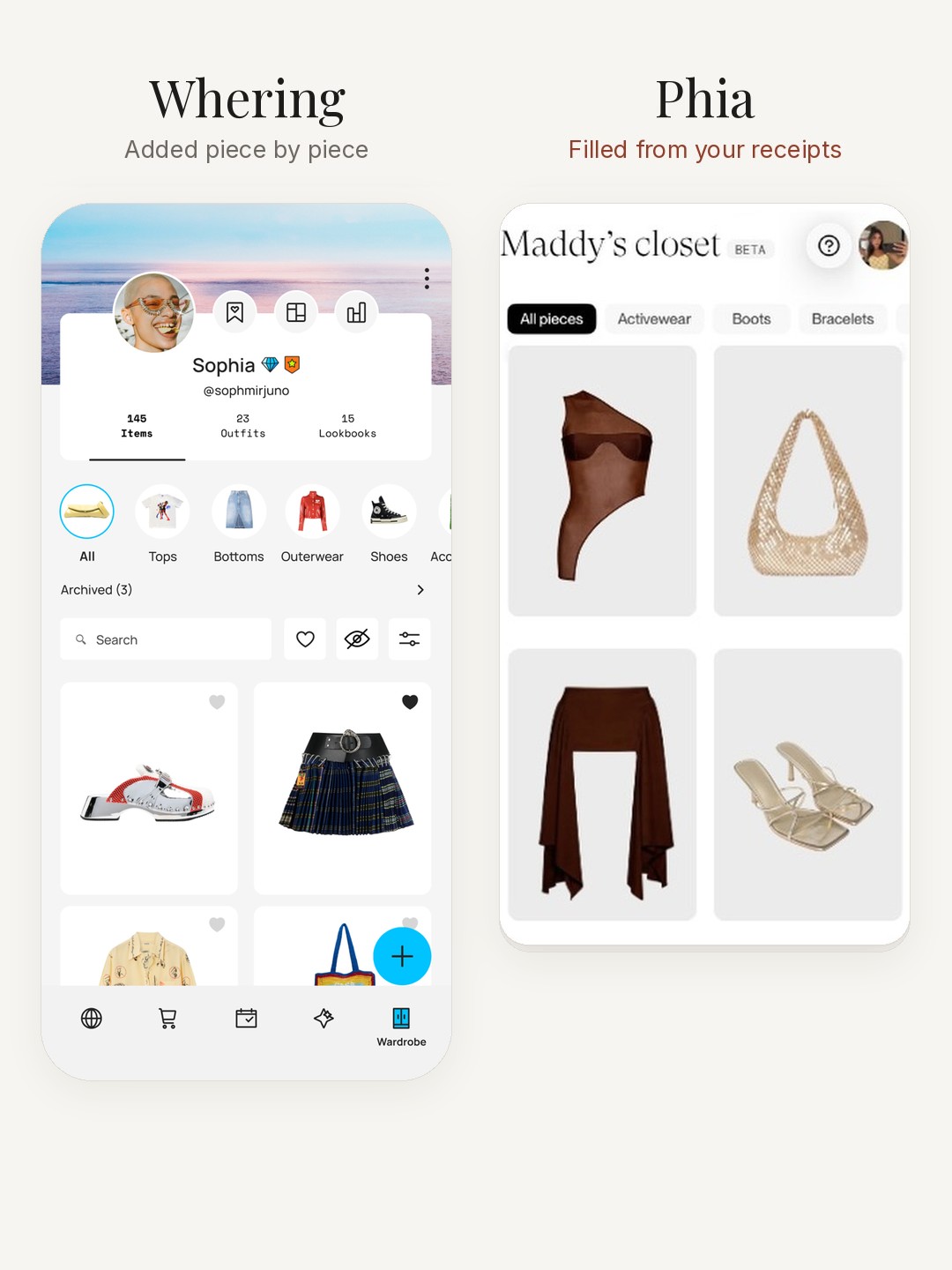
Put the two apps next to each other and the difference shows up on the very first screen. Whering's closet is a profile: your photo, a count of items, outfits and lookbooks, and a grid you fill in as you go, piece by piece.
Phia's closet looks finished from the start. Maddy's, a chocolate top, a cream shoulder bag, a long brown wrap and strappy heels, is all retailer product photos, the kind Gmail sync brings in, so nothing had to be shot, cropped or tagged.
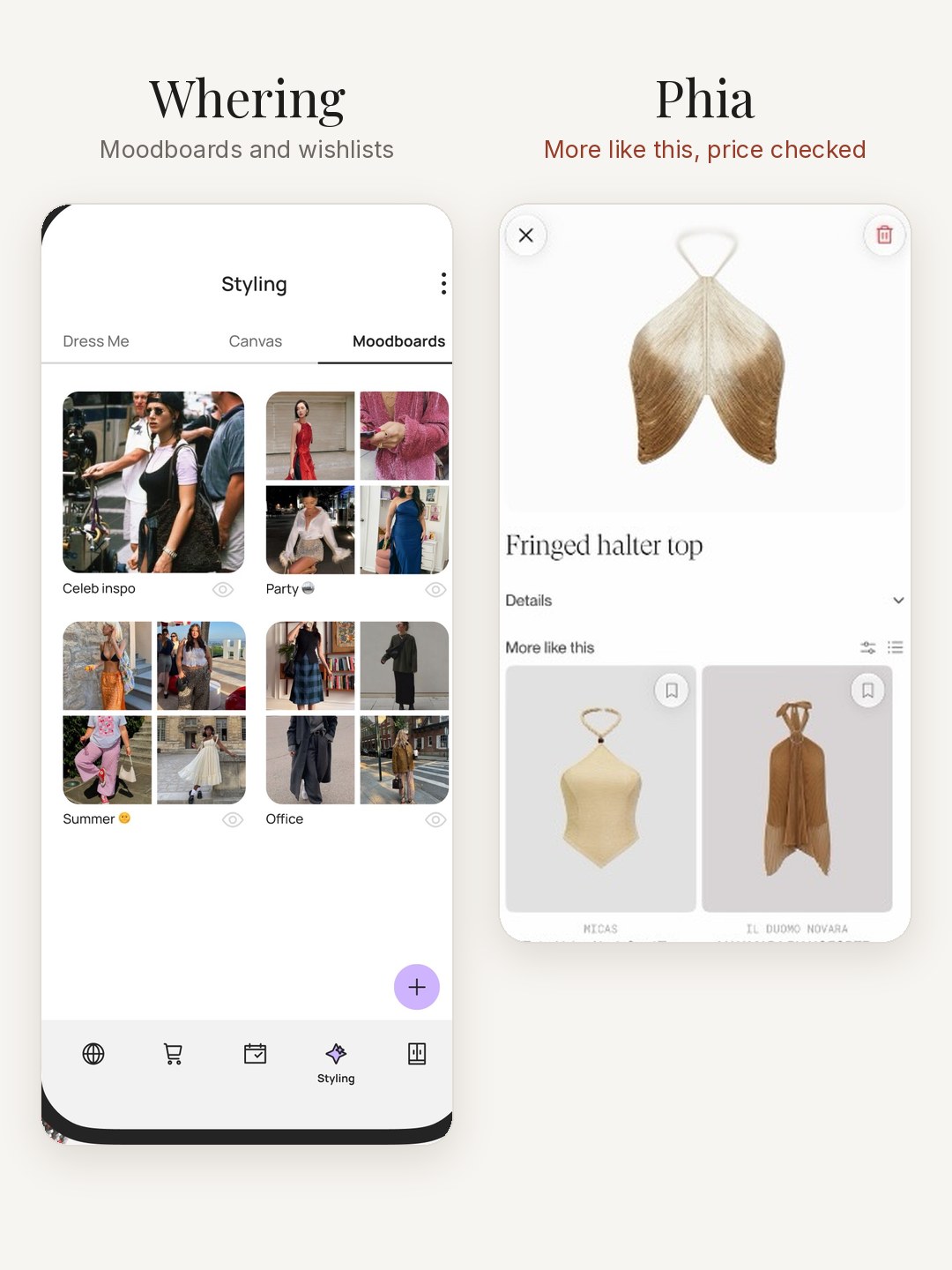
The same gap shows up when you want something new. Whering gives you moodboards and wishlists to collect ideas. Phia opens any piece in your closet and shows More like this, real items you can buy, each one price checked across more than 220,000 sites.
Task: Uploading your closet
My pick: Phia.
Whering's App Store description says the closet is free with no item limit. You add clothes by photo, with the background removed, from its item database, or from retailer sites through browser and mobile extensions, and its terms describe connecting supported retailer accounts for purchase history. Reviews praise the concept and, like most of the category, mention how long cataloguing takes.
Phia skips most of that. Connect Gmail and Phia turns retailer order confirmations, receipts and shipping emails into closet items with photos, brand, size and color filled in. Instant camera roll sync turns the clothes you have already photographed into closet pieces. And purchases you finish with the Phia browser extension land in the closet at checkout.
Confession #1: the reason my old closets stalled was always the uploading, never the styling. Phia is the first one where most of my wardrobe was there before I had done anything.

Task: Planning your outfits
My pick: Phia, by a nose.
Both apps let you plan outfits. Whering's planner suggests outfits from your wardrobe and the weather, and its shuffle feature mixes pieces for you. Its Outfit Maker is one of the optional paid extras.
Phia's Outfits tab lets you plan the classic way too: tap Add outfit, pick your pieces, name it and save it. Where it pulls ahead is that Phia's algorithm instantly suggests how to pair the items you own. Suggested outfits for you sits at the top of the tab, ready to save with a tap. Style from one item builds a full outfit around a single piece, and Generate outfit starts from scratch, using only your clothes. Because the closet filled itself, those suggestions draw on your whole wardrobe rather than the part you had time to photograph.

Task: Getting styled every day
My pick: a tie, for different reasons.
Whering's social side is real and charming: friends can style your closet, and there is a community to browse for ideas. If getting dressed is a group activity for you, that matters.
Phia's version is more personal. In the For you tab, Styled by Phia sends a new outfit idea every day from your own closet once you have five tops and five bottoms, and the outfit of the day can factor in the weather if you add your city. Each idea has a name, a date and a button to save it to your outfits.

A week of switching, day by day
Day one, I connected Gmail and watched the closet fill while I made coffee: two years of online orders turned into tops, denim and the shoes I bought for a wedding and forgot. Camera roll sync added the vintage pieces I had photographed and never catalogued.
Day two, I opened Outfits and took the first suggestion Phia offered for a Tuesday at the office. It paired a cream knit I never wear with trousers I wear constantly, which was exactly the point.
Day four, Style analysis told me I lean classic minimalist with a gold accent, which explained every jewelry purchase of the past year. I added two styling rules and edited one vibe.
Day six, I nearly bought a black blazer. Phia's price check found the same one secondhand for less, and the closet showed me the two I already own. I bought neither.
In my old Whering closet, the same week started with a Sunday of photography. That is the real difference, and it compounds.
What Whering reviewers keep asking for
I read through Whering's recent App Store reviews before writing this, because reviews tell you what a listing never will. Three themes come up again and again.
The first is time. Plenty of people love the idea and stall on the photography, which is the story the whole category tells. Phia's answer is to skip that step: Gmail sync, camera roll sync and checkout capture fill the closet while you get on with your day. Phia says more than 180,000 people have added over two million items since its closet launched.
The second is friction: reports of glitches, slow loading and outfits that will not save or filter. Phia's closet lives inside the same app people already open to shop, so it is not a separate habit to keep up. It gets opened because you are already there.
The third is fit: suggestions that do not feel like the person, and requests for more control over occasions and shuffles. This is where Style analysis earns its place. It writes down your style, your colors, your vibes and up to ten styling rules you swear by, so the closet has a brief to work from. Confession #2: my first rule was never wear blue with black, and seeing it written next to my closet felt like a stylist had finally taken notes.

Task: Understanding your closet, and shopping
My pick: Phia.
Phia's new Style analysis tab reads your closet and describes your style back to you in a few sentences, then shows your top colors by percentage, your vibes, your top brands and a count of your items and outfits. You can add up to ten styling rules you swear by, and the analysis refreshes as your closet grows.
Then there is shopping, where the two apps really part ways. Phia is a shopping assistant first: it compares prices across more than 220,000 sites, new and secondhand, applies coupons at checkout and watches for price drops, with your closet one tap away. Whering's center of gravity is the outfit. Phia's is the outfit and the purchase.
My read: if you want a closet you curate by hand with friends, Whering is a pleasure. If you want a closet that builds itself, styles you every day and keeps you from buying the same black blazer twice, Phia is the one. Both are free to download.
Phia vs Whering: quick answers
Is Phia free like Whering? Yes. Phia is free to download on the App Store, and the closet, outfits and Style analysis are part of the app. Whering's core closet is free too, with optional paid extras like its Outfit Maker.
Can I move my Whering closet to Phia? There is no transfer button, and you rarely need one. Connect Gmail and Phia rebuilds most of an online-shopped wardrobe from your receipts, and camera roll sync picks up the clothes you have already photographed.
Does Phia plan outfits like Whering? Yes, and it writes more of the first draft. Build looks yourself, take Suggested outfits for you, build around one piece with Style from one item, or get a new idea every day from Styled by Phia.
What is new in Phia this fall? “More like this” finds similar pieces to anything in your closet, you can build full outfits from your saved items, and you can import any outfit photo to turn what you are wearing into shoppable closet pieces.
Where does Phia work? On iPhone with a Safari extension, in Chrome and on phia.com. If you want to keep browsing, I also put together The Suede Jacket Is Back and Slightly Different.